


Loading...

* Actual products may vary slightly due to continuous design enhancments.

Essential Components

Essential Components for a USB Multi-Colour Fairy Light Installation

To ensure a safe, reliable and neat installation, you'll need the following components:

  • USB Power Source – Provides 5V DC power for the fairy lights. This can be a USB wall charger, laptop, power bank or another compatible USB power source.
  • USB Multi-Colour Fairy Lights – RGB LED fairy lights featuring a flexible cable and colourful illumination, ideal for decorative and ambient lighting applications.
  • USB Controller with Remote Receiver (Supplied) – Allows you to switch the lights on and off, select colours, adjust brightness and choose different lighting modes using the supplied remote.
  • USB Wall Charger (Optional) – Useful for powering the fairy lights from a standard wall socket. Ensure the charger provides the required 5V DC output.
  • Power Bank (Optional) – Provides portable power for camping, outdoor decorations and areas without convenient access to a wall socket.
  • Extension Lead (Optional) – Useful when the USB power source is further away from the installation area.
  • Mounting Clips or Cable Hooks – Help secure the fairy lights neatly along walls, fences, pergolas, ceilings and other mounting surfaces.
  • Cable Ties (Optional) – Useful for securing and organising excess cable during installation.
  • Mounting Accessories – Screws, hooks, clips or suitable adhesive cable holders for a secure installation.

Important: These fairy lights are USB-powered and designed to operate from a compatible 5V DC USB power source. Do not connect the lights directly to a 230V AC power supply. Always use the supplied USB controller and ensure the power source meets the manufacturer's specifications.

For outdoor installations, check the product's IP rating before use. Keep the USB controller, connections and power source protected from water and moisture unless specifically rated for outdoor use.

Using the correct USB power source and mounting accessories will help ensure a neat, reliable installation while creating colourful decorative lighting for bedrooms, patios, gardens, camping setups, parties and entertainment areas.

String Light LED RGB USB Fairy Lights with Remote

5m & 10m , Multi Colour

Online Price:
Price range: R138.00 through R207.00 Vat Incl.

Unit: Each
Input5V USB
Cable ColourClear
MaterialPlastic
LensClear Lens
Colour TempMulti Colour
IP RatingIP44
Functions14 Customisable Functions
Warranty1 Year
What Power Supply Do I Need?

Essential Components for a USB Multi-Colour Fairy Light Installation

To ensure a safe, reliable and neat installation, you'll need the following components:

  • USB Power Source – Provides 5V DC power for the fairy lights. This can be a USB wall charger, laptop, power bank or another compatible USB power source.
  • USB Multi-Colour Fairy Lights – RGB LED fairy lights featuring a flexible cable and colourful illumination, ideal for decorative and ambient lighting applications.
  • USB Controller with Remote Receiver (Supplied) – Allows you to switch the lights on and off, select colours, adjust brightness and choose different lighting modes using the supplied remote.
  • USB Wall Charger (Optional) – Useful for powering the fairy lights from a standard wall socket. Ensure the charger provides the required 5V DC output.
  • Power Bank (Optional) – Provides portable power for camping, outdoor decorations and areas without convenient access to a wall socket.
  • Extension Lead (Optional) – Useful when the USB power source is further away from the installation area.
  • Mounting Clips or Cable Hooks – Help secure the fairy lights neatly along walls, fences, pergolas, ceilings and other mounting surfaces.
  • Cable Ties (Optional) – Useful for securing and organising excess cable during installation.
  • Mounting Accessories – Screws, hooks, clips or suitable adhesive cable holders for a secure installation.

Important: These fairy lights are USB-powered and designed to operate from a compatible 5V DC USB power source. Do not connect the lights directly to a 230V AC power supply. Always use the supplied USB controller and ensure the power source meets the manufacturer's specifications.

For outdoor installations, check the product's IP rating before use. Keep the USB controller, connections and power source protected from water and moisture unless specifically rated for outdoor use.

Using the correct USB power source and mounting accessories will help ensure a neat, reliable installation while creating colourful decorative lighting for bedrooms, patios, gardens, camping setups, parties and entertainment areas.

Frequently Asked Questions – USB Multi-Colour Fairy Lights

1. What accessories do I require for a basic installation and how do I connect them?

For a basic installation, you would require:

  • 1 × USB Multi-Colour Fairy Light Set
  • 1 × Supplied USB Controller with Remote
  • 1 × Compatible 5V USB Power Source

Simply connect the fairy lights to the supplied USB controller and plug the USB connector into a suitable power source. Use the remote to switch on the lights and select your preferred colours or lighting modes. See the installation diagram for guidance.

2. Are there any other items or optional extras that I may need?

Depending on your application, you may need:

  • USB Wall Charger – For powering the fairy lights from a standard wall socket.
  • Power Bank – Provides portable power for camping, outdoor decorations and areas without convenient access to a wall socket.
  • Mounting Clips or Cable Hooks – To secure the fairy lights neatly in position.
  • Cable Ties – For organising and securing excess cable.
  • Extension Lead – If your USB power source is further away from the installation area.
  • Mounting Hooks or Adhesive Clips – For securing the lights to walls, pergolas, fences and other surfaces.

3. What Power Supply would I use?

Our USB Multi-Colour Fairy Lights are designed to operate from a compatible 5V DC USB power source.

Suitable power sources include:

  • USB wall chargers
  • Laptop USB ports
  • Power banks
  • Compatible USB charging ports

Always check the product specifications and use a power source that meets the manufacturer's requirements.

4. Do I need to calculate the Power Supply size?

No. For a standard installation, a separate LED power supply calculation is generally not required.

Simply use a compatible 5V USB power source capable of supplying the required current for the fairy lights.

5. What are the benefits of using mounting clips?

Mounting Clips and Cable Hooks help to:

  • Secure the fairy lights neatly in position.
  • Prevent unnecessary tension on the cable.
  • Create an even and professional-looking installation.
  • Make installation and repositioning easier.
  • Reduce the risk of cable damage from unsuitable fastening methods.

6. Can I install USB Multi-Colour Fairy Lights myself?

Yes! USB Multi-Colour Fairy Lights are designed for straightforward plug-and-play installation.

Simply connect the lights to the supplied USB controller, plug them into a compatible USB power source and secure the cable using appropriate mounting accessories.

7. Do you have DIY Kits with everything included?

Our USB Multi-Colour Fairy Lights offer a convenient decorative lighting solution with USB power and remote-control operation.

Depending on the specific product, the USB controller and remote may be included. Additional mounting accessories and a USB wall charger may be required depending on your application. Check the product listing for the exact included components.

8. Can I get an electric shock from the Fairy Lights?

The fairy lights operate from a low-voltage 5V USB power source, reducing the risk of electric shock on the LED side. However, any USB wall charger connected to 230V mains electricity can present an electric shock risk if handled incorrectly.

Always:

  • Keep the USB power source and connections dry unless specifically rated for outdoor use.
  • Never connect the fairy lights directly to 230V mains power.
  • Do not use damaged cables, USB plugs or controllers.
  • Switch off and disconnect the USB power before inspecting or repositioning the lights.

9. Can the Fairy Lights bend around corners or curved shapes?

Yes! The flexible cable allows the fairy lights to be arranged around suitable curved surfaces, pergolas, railings, branches, mirrors and decorative structures.

However, avoid sharp bends, excessive twisting or pulling, as this may damage the internal wiring.

10. Can I cut or shorten the Fairy Lights?

No. The fairy light cable should not be cut, shortened, spliced or modified unless specifically permitted by the manufacturer.

Doing so may damage the LEDs, compromise electrical safety and affect the operation of the lights.

11. How are the Fairy Lights mounted?

USB Multi-Colour Fairy Lights can be mounted using suitable clips, hooks, cable ties or other appropriate fixing accessories.

For the best installation:

  • Secure the cable without pinching or damaging it.
  • Avoid using nails or staples directly over the cable.
  • Do not pull the cable tightly between mounting points.
  • Allow enough support to prevent excessive strain on the connections.
  • Keep the USB controller accessible for convenient operation.

12. Can the Fairy Lights be dimmed?

Yes, where supported by the supplied controller and remote.

Depending on the model, you may be able to adjust brightness, select different colours and choose various lighting effects. Always use the supplied controller and remote rather than connecting an external LED dimmer.

13. Can I use the Fairy Lights outdoors?

This depends on the IP rating of the fairy lights, USB controller and electrical connections.

Always check the product specifications before outdoor installation.

Ensure the USB power source, controller and connections are protected from rain and moisture unless specifically rated for outdoor use. A USB power bank can be a convenient alternative where a suitable outdoor-rated mains connection is unavailable.

14. Can I connect multiple Fairy Light sets together?

Do not connect multiple sets together unless the manufacturer specifically confirms that the product supports this.

Each set should be operated according to its specified power requirements. Connecting additional sets may overload the USB power source or damage the controller.

USB Multi-Colour Fairy Lights Installation & Setup

Installing USB Multi-Colour Fairy Lights is quick and straightforward thanks to their plug-and-play design and USB power connection. Follow these simple steps to ensure a safe, neat and reliable installation.

Step 1: Plan Your Installation

Measure the area where you want to install the fairy lights and determine the best positioning for the cable. Ensure a suitable USB power source is available within reach, such as a USB wall charger, laptop or power bank.

Step 2: Prepare the Installation Area

Ensure the mounting area is clean, dry and free from sharp edges or objects that could damage the cable. Plan the cable route to achieve even light distribution and a neat appearance.

Step 3: Unwind the Fairy Lights

Carefully remove the fairy lights from their packaging and fully unwind the cable. Avoid pulling, stretching or twisting the cable excessively, as this may damage the internal wiring or LED connections.

Step 4: Connect the USB Controller

Connect the fairy lights to the supplied USB controller, ensuring the connection is properly secured. The controller allows you to operate the lights using the supplied remote, including selecting colours, adjusting brightness and changing lighting modes.

Step 5: Test Before Mounting

Connect the USB plug to a compatible 5V USB power source and switch on the lights. Use the remote control to test the different colours, brightness settings and lighting modes. Once tested, disconnect the USB power before proceeding with installation.

Step 6: Secure the Fairy Lights

Position the fairy lights along the desired area and secure them using suitable mounting clips, hooks or cable ties. Avoid placing excessive tension on the cable or fastening it too tightly.

Step 7: Connect to Power

Once the fairy lights are securely installed, reconnect the USB plug to your chosen power source. Use the remote control to select your preferred colour and lighting effect.

Installation Tips

  • Always use a compatible 5V USB power source.
  • Use the supplied USB controller and remote for full functionality.
  • Do not cut, shorten, splice or modify the fairy light cable.
  • Avoid sharp bends, excessive pulling or twisting of the cable.
  • Do not use nails, staples or sharp fasteners that could damage the wiring.
  • Keep the USB controller and electrical connections protected from water and moisture unless specifically rated for outdoor use.
  • Check the product's IP rating before installing in outdoor or damp environments.
  • Avoid placing the fairy lights near excessive heat or open flames.
  • Do not connect multiple fairy light sets together unless the manufacturer specifically allows it.
  • Ensure the cable is fully unwound during operation and is not tightly bundled.
  • Switch off and disconnect the USB power before cleaning, adjusting or repositioning the lights.
  • Keep the remote control accessible for convenient operation.

Following these installation steps will help ensure safe operation, reliable performance and vibrant multi-colour illumination. Whether decorating a bedroom, patio, garden, pergola, gaming area, camping setup or event venue, USB Multi-Colour Fairy Lights provide a simple and versatile way to add colour and atmosphere to any space.

USB Multi-Colour Fairy Lights Troubleshooting & Recommendations

Common Issues & Solutions

Fairy lights won't turn on

  • Check that the USB plug is properly connected to the USB power source.
  • Ensure the USB power source is switched on and supplying power.
  • Check that the USB controller and fairy light connections are securely connected.
  • Press the ON button on the supplied remote or controller.
  • Inspect the USB cable and connections for visible damage.

Only some LEDs are working

  • Check the cable for visible damage or signs of pinching.
  • Inspect the connections between the USB controller and fairy light string.
  • If individual LEDs or sections are not illuminating, the LED string may have a damaged connection or faulty component.
  • Disconnect the power before inspecting the connections.

Lights are flickering

  • Check that the USB plug is properly connected to the power source.
  • Ensure the USB power source provides the required 5V DC output.
  • Inspect the USB cable and connections for visible damage.
  • An unsuitable or faulty USB power source may cause unstable operation.
  • If flickering continues, discontinue use and have the lights checked.

Lights are dim or unusually bright

  • Ensure a compatible 5V USB power source is being used.
  • Check for signs of damage to the USB controller or cable.
  • Use the remote control to adjust the brightness where supported.
  • Do not substitute the power source unless its output specifications are confirmed compatible.

Remote control is not working

  • Check that the remote has a working battery.
  • Ensure the remote is pointing towards the controller's infrared receiver, where applicable.
  • Remove any obstructions between the remote and receiver.
  • Check that the USB controller is receiving power.
  • Try the controller's manual button, if provided.

Lights stop working intermittently

  • Check for loose connections at the USB plug, controller or light string.
  • Inspect the cable for damage caused by pulling, twisting or sharp bends.
  • Check whether the USB controller or power source is overheating.
  • Disconnect the lights immediately if you notice unusual heat, burning smells or damaged wiring.

Recommendations

  • Always use a compatible 5V USB power source.
  • Use the supplied USB controller and remote.
  • Fully unwind the fairy lights before switching them on.
  • Avoid pulling, stretching, twisting or sharply bending the cable.
  • Use suitable mounting clips or hooks to secure the cable without damaging it.
  • Keep the USB controller and connections protected from moisture unless specifically rated for outdoor use.
  • Check the product's IP rating before using the lights outdoors.
  • Avoid connecting multiple sets together unless specifically approved by the manufacturer.
  • Switch off and disconnect the USB power before repositioning or inspecting the lights.
  • Replace damaged controllers or cables rather than attempting makeshift repairs.

Following these recommendations will help maintain reliable operation, vibrant multi-colour illumination and a longer service life for your USB Multi-Colour Fairy Lights.


USB Multi-Colour Fairy Lights Safety Tips

To ensure safe installation and reliable operation, follow these important safety guidelines:

  • Always switch off and disconnect the USB power before installing, adjusting or inspecting the fairy lights.
  • Only use a compatible 5V USB power source.
  • Never connect the USB fairy lights directly to 230V AC mains power.
  • Do not cut, splice, shorten or modify the fairy light cable.
  • Avoid pulling, stretching, twisting or excessively bending the cable.
  • Keep the USB controller and power connections dry unless specifically rated for outdoor use.
  • Check the product's IP rating to determine whether the fairy lights are suitable for indoor or outdoor applications.
  • Do not use the lights if the cable, LEDs, USB plug or controller show signs of damage.
  • Ensure the USB power source has adequate ventilation and is not covered by fabric, insulation or other materials.
  • Keep the lights away from open flames, heaters and other sources of excessive heat.
  • Do not use nails, staples or sharp fasteners that could damage the wiring.
  • Avoid placing the cable where it could become a tripping hazard or be crushed by furniture or doors.
  • Do not attempt to open or repair the USB controller or power source.
  • Regularly inspect the installation for damaged cables, loose connections or signs of overheating.
  • Keep the USB controller, wiring and small components out of reach of young children.

Following these safety precautions will help ensure safe operation, reliable performance and a long service life for your USB Multi-Colour Fairy Lights.

USB Multi-Colour Fairy Lights – Applications & Use Cases

USB Multi-Colour Fairy Lights are a versatile decorative lighting solution, ideal for adding vibrant colours and a fun atmosphere to residential and commercial spaces. Featuring colourful RGB LED lights on a flexible cable, they are perfect for decorating indoor areas, enhancing entertainment spaces and adding colourful ambient lighting to special occasions.

Common applications include:

  • Bedroom and headboard decorations
  • Patio and outdoor entertainment areas
  • Garden and landscaping decorations
  • Pergolas and gazebos
  • Balcony and veranda lighting
  • Wedding and event decorations
  • Birthday parties and celebrations
  • Restaurant and café decorations
  • Bars and entertainment venues
  • Retail window displays
  • Shop and showroom decorations
  • Festive and Christmas decorations
  • Camping and caravan lighting
  • Gaming rooms and desk setups
  • TV backlighting and entertainment units
  • Shelves, mirrors and table decorations
  • DIY decorative lighting projects

With their flexible cable, vibrant multi-colour illumination and convenient USB power connection, these fairy lights are an easy way to transform ordinary spaces into colourful, inviting environments. Suitable for temporary decorations and everyday decorative lighting, they can be powered using compatible USB wall adapters, laptops or power banks.

USB Multi-Colour LED Fairy Lights

Our USB Multi-Colour LED Fairy Lights create a vibrant, colourful atmosphere, making them ideal for decorative and ambient lighting applications. Featuring bright, energy-efficient RGB LEDs on a flexible cable, these fairy lights produce a beautiful range of colours, perfect for bedrooms, patios, gardens, pergolas, camping setups, parties, weddings, events and festive decorations. Powered via USB for convenient connection to compatible USB power sources, they offer a versatile and easy-to-use lighting solution for adding colour and sparkle to residential and commercial spaces.
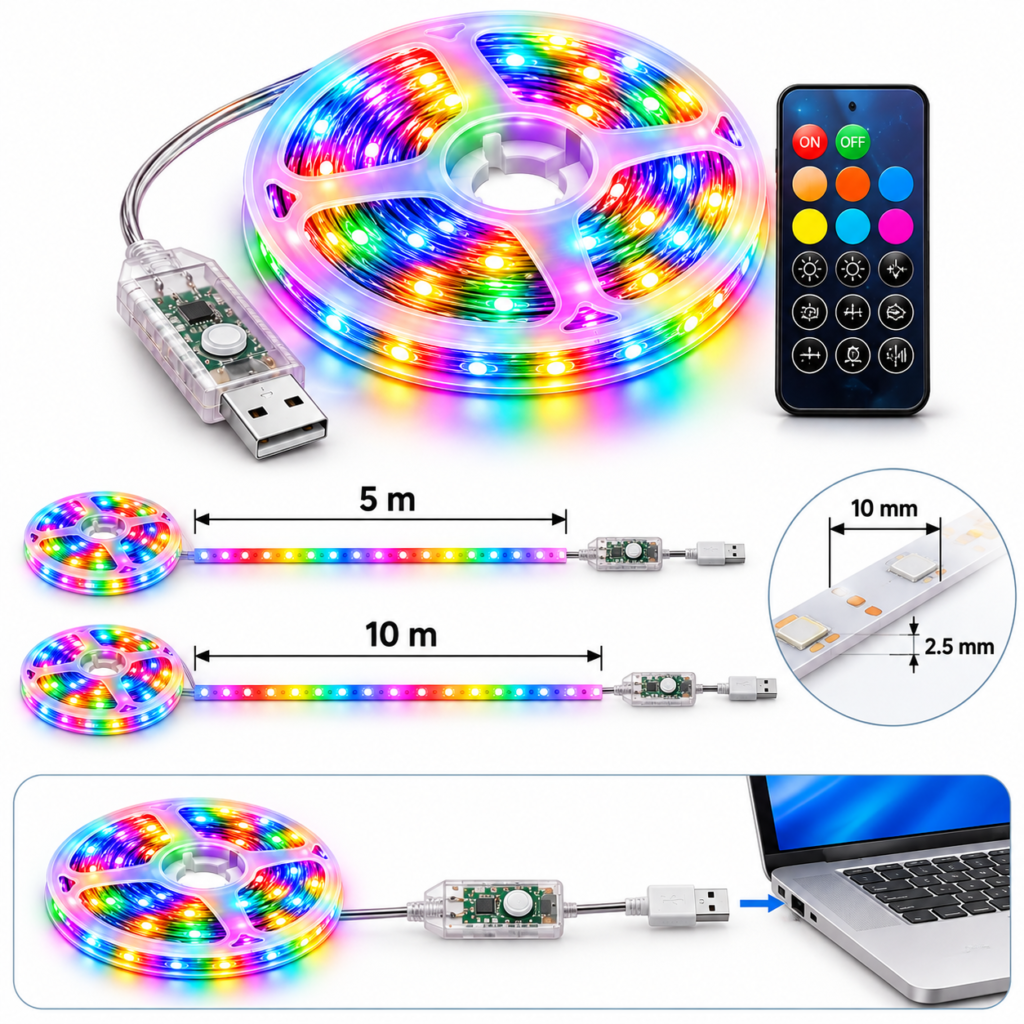
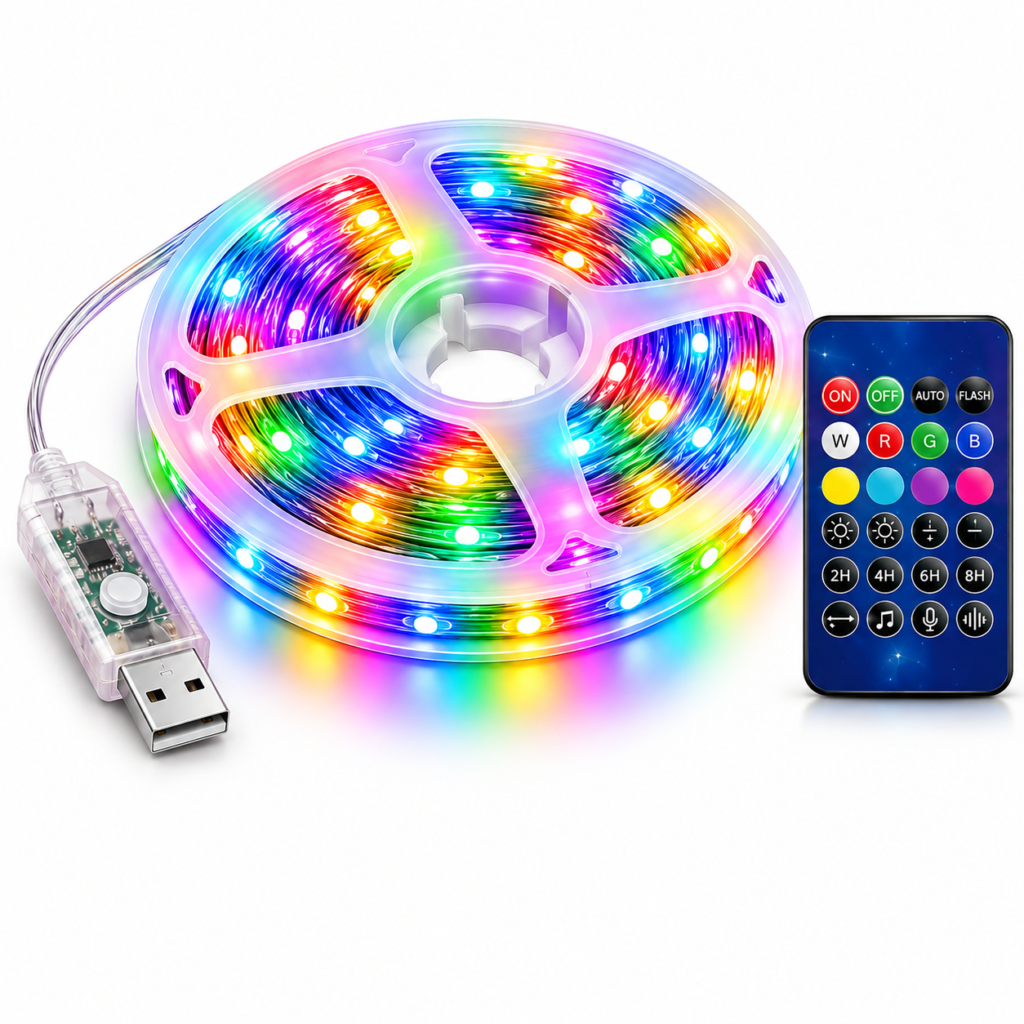
Colours & Diagrams

string light / led rgb usb / fairy lights with remote string light / led rgb usb / fairy lights with remote

Additional information

Weight0.050 kg
Dimensions20 × 10 × 5 cm
Length

5 Metre, 10 Metre

Specifications

Fresh Picks